OEE & Production Visibility
Know What Your Lines Are Doing. Right Now, Not Tomorrow.
Most factories track OEE in spreadsheets filled out after the shift. By the time the number lands on a dashboard, the loss has already happened. UMH gives you real-time OEE, downtime classification, and performance tracking, built on your actual machine data, not manual operator input.
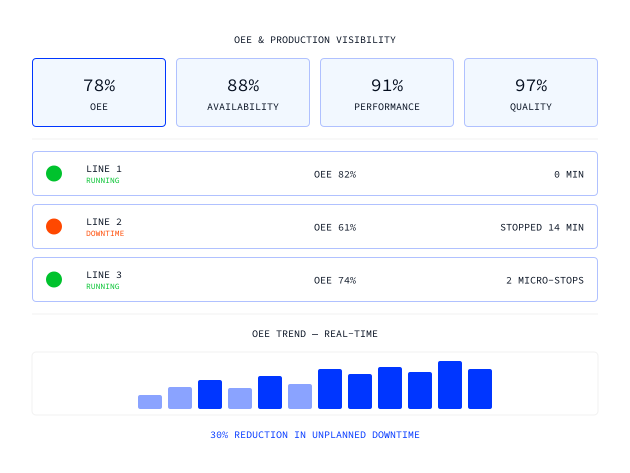

Automated downtime detection and stop reason classification
Customizable dashboards per role: operator, line manager, plant director
Real-time OEE across every line and plant, no end-of-shift entry
Performance loss and micro-stoppage tracking
Quality and scrap rate monitoring
Built on open standards, no proprietary lock-in, no per-tag licensing
Trusted by global enterprises








The Challenge
Your OEE number is always a day late and a guess away
The number arrives after the damage is done
Most factories calculate OEE at the end of the shift, or at best at the end of the hour. An operator fills in a paper log. A supervisor transfers it to a spreadsheet. By the time the figure hits a manager's screen, the line has been running, or not running, for hours without anyone reacting to the actual state. A number that's always 8 hours old isn't a KPI. It's a post-mortem.
Downtime gets logged, but not understood
When a line goes down, most teams know the machine stopped. What they don't know is why, or how often the same thing has happened in the last 30 days. Stop reasons are either not captured at all, entered manually with vague categories, or buried in a system no one can query. The result is that the same failures repeat, maintenance teams react to the same machines over and over, and nobody has the data to break the cycle.
You can't benchmark what you can't compare
OEE visibility on one line means almost nothing if the line next to it is a black box. In most plants, data infrastructure grew piecemeal: one line got a SCADA with some OEE reporting, another has a standalone MES module, a third still relies on paper. Getting a complete picture across all lines and shifts requires stitching together sources that were never designed to talk to each other. Cross-plant benchmarking, comparing shift A against shift B, or site one against site two, is either a manual reporting exercise or doesn't happen at all.
"We didn't buy a single-purpose product. We bought something we can use across all our use cases."

Head of IT
Our solution
Real OEE, from real machine data, across every line, every site.
UMH connects directly to your machines and PLCs, captures state changes in real time, and calculates OEE automatically, without relying on manual operator input. The data flows into customizable Grafana dashboards that each role can actually use: operators see their line, line managers see their shift, plant directors see everything. And because every connection runs through the same Unified Namespace, you're always looking at the same number, calculated the same way, whether you're on the line or in the boardroom.

UMH captures machine states directly via OPC UA, S7, Modbus, and other industrial protocols. Availability, Performance, and Quality are calculated automatically as data arrives, no operator entry, no spreadsheet, no delay. The number you see reflects what's happening right now.
Real-time OEE from the machine up
When a machine stops, UMH detects it instantly and prompts structured reason classification, or classifies automatically where the signal allows it. Stop reasons are stored, trended, and surfaced in Pareto views so maintenance and production teams can see what's causing the most loss and prioritize accordingly.
Downtime classification that actually sticks
Every dashboard is built on Grafana, flexible enough to match what each person actually needs to see. Operators get their line, shift managers get their floor, plant directors get the full picture. Templates ship pre-built for common views: machine states, shift comparisons, KPI summaries, and stop reason histograms.
The right view for every person
Because all data flows through the same Unified Namespace, comparing shift A against shift B, or site one against site two, is built in, not bolted on. Identify where performance is best, understand why, and replicate it. This is how continuous improvement actually scales across an organization.
Best practice, replicated at scale
From raw machine signals to a live OEE dashboard in four steps
Step
Connect your machines
UMH connects directly to PLCs and controllers via all major industrial protocols, OPC UA, S7, Modbus, EtherNet/IP, and more, with no custom integration work required.
step
•
TEXT
Connect your machines
The format:
- 30 minutes to code.
- 15 minutes to discuss what you'd change to make it production-ready.
The format:
- 30 minutes to code.
- 15 minutes to discuss what you'd change to make it production-ready.
The format:
- 30 minutes to code.
- 15 minutes to discuss what you'd change to make it production-ready.
Step
Define your states and shifts
Configure what counts as running, stopped, or degraded for each machine, and map your shift model so OEE is calculated against your actual planned production time.
step
•
TEXT
Define your states and shifts
The format:
- 30 minutes to code.
- 15 minutes to discuss what you'd change to make it production-ready.
The format:
- 30 minutes to code.
- 15 minutes to discuss what you'd change to make it production-ready.
The format:
- 30 minutes to code.
- 15 minutes to discuss what you'd change to make it production-ready.
Step
Classify and contextualize
Stop reasons are captured and structured at the point of detection, either automatically from machine signals or via operator prompts, so downtime data is clean and consistent from day one.
step
•
TEXT
Classify and contextualize
The format:
- 30 minutes to code.
- 15 minutes to discuss what you'd change to make it production-ready.
The format:
- 30 minutes to code.
- 15 minutes to discuss what you'd change to make it production-ready.
The format:
- 30 minutes to code.
- 15 minutes to discuss what you'd change to make it production-ready.
Step
Visualize and act
Live OEE, Availability, Performance, and Quality metrics appear instantly on role-specific Grafana dashboards. Alerts fire the moment a line deviates from target, before the loss compounds.
step
•
TEXT
Visualize and act
The format:
- 30 minutes to code.
- 15 minutes to discuss what you'd change to make it production-ready.
The format:
- 30 minutes to code.
- 15 minutes to discuss what you'd change to make it production-ready.
The format:
- 30 minutes to code.
- 15 minutes to discuss what you'd change to make it production-ready.
Frequently asked questions.
What if I'm already getting OEE data from Siemens, Ignition, or my MES?
Does UMH require operators to enter data manually?
How long does it take to get OEE live on a first production line?
Can I compare OEE across multiple sites?
START WITH UMH
Stop calculating OEE after the fact
Talk to our team about how UMH connects to your machines and gets real-time OEE live in your plant. Or explore the platform yourself, fully open source.